
Your organic traffic just dropped. Maybe it was 20 percent. Maybe it was 50. The Google Search Console graph looks like a cliff edge. Your Slack is buzzing. Leadership is asking questions. The instinct to act is overwhelming.
Stop.
Do not publish more AI content. Do not start deleting pages at random. Do not rewrite your entire homepage because you read a hot take on X.
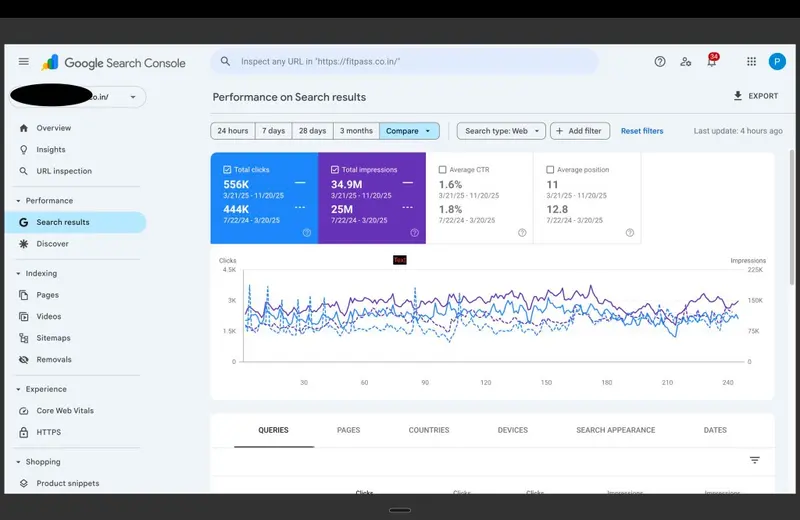
Google Search Console showing a dramatic traffic drop after a Core Update
Diagnosis must precede prescription.
If you are a founder, CMO, marketing director, or in-house SEO lead managing a YMYL, SaaS, or e-commerce property, this framework is for you. Over the next 48 hours, you will move from panic to precision. You will isolate signal from noise, identify the true root cause of your traffic decline, and build a recovery plan grounded in systems, not speculation.
This is not about quick fixes. This is about building a repeatable diagnostic protocol you can deploy after any algorithmic shift. Because the next update is already coming.
Systems over tactics. Stop guessing, start measuring.
Hour 1 to 4: Data Quarantine and Signal Verification
Before you touch a single line of code or brief a single writer, you must verify the signal. Not every traffic fluctuation is an algorithmic event. Not every algorithmic event requires the same response.
Step 1: Confirm the Drop Is Real and Algorithmic
- Pull 90 days of organic traffic data from Google Analytics 4 and Google Search Console.
- Filter for organic search only. Exclude branded queries to isolate non-brand visibility changes.
- Cross-reference the drop date with confirmed Google Core Update rollout windows (use resources like SearchLiaison on X or the Google Search Status Dashboard).
- Check Google Search Console for manual actions under "Security and Manual Actions". If none exist, you are dealing with an algorithmic re-evaluation, not a penalty.
Key insight: A traffic drop following a core update is rarely a punishment. It is Google recalibrating how it assesses your technical debt, content depth, or topical authority relative to competitors who improved during the same period.
Step 2: Segment the Loss
Do not treat "organic traffic" as a monolith. Segment to diagnose:
- By page type: Are product pages, blog posts, or category pages most affected?
- By query intent: Did informational, commercial, or transactional queries decline?
- By device: Is the drop isolated to mobile, where Core Web Vitals carry more weight?
- By geography: Is the impact regional, suggesting a local ranking shift?
Use GSC's performance report with filters for page, query, country, and device. Export to CSV for deeper analysis in a spreadsheet.
Step 3: Quarantine Your Data
Create a dedicated folder or dashboard for this diagnostic session. Save all exports, screenshots, and notes here. This prevents context switching and ensures your team is working from a single source of truth.
Publishing more content to fix a drop is like accelerating a car with a broken axle.
Hour 4 to 12: The Technical Sweep
With the signal verified, shift to infrastructure. Technical issues are the silent killers of organic recovery. If your site cannot be crawled, rendered, or indexed efficiently, no amount of content excellence will save you.
Core Web Vitals and Page Experience Audit
- Run a sample of your top 20 declining pages through PageSpeed Insights or CrUX Dashboard.
- Focus on Interaction to Next Paint (INP), Largest Contentful Paint (LCP), and Cumulative Layout Shift (CLS).
- Flag any page with "Poor" status on mobile. Prioritize fixes for pages with high impression share but low CTR.
If you need a deeper dive on INP optimization, see our guide: Interaction to Next Paint (INP) Demystified.
Crawlability and Indexation Health Check
Even after a recovery, no site is ever 'done.' Audits often reveal unresolved technical debt—proof that SEO is a continuous system, not a one-time fix. Critical issues to look for include:
- Canonicals: Outside <head> (Google may ignore them entirely)
- Page Titles: Outside <head> (Titles may not be read by crawlers)
- Validation: Multiple <head> Tags (Breaks metadata parsing)
- Response Codes: Internal Blocked by Robots.txt (Googlebot can't crawl)
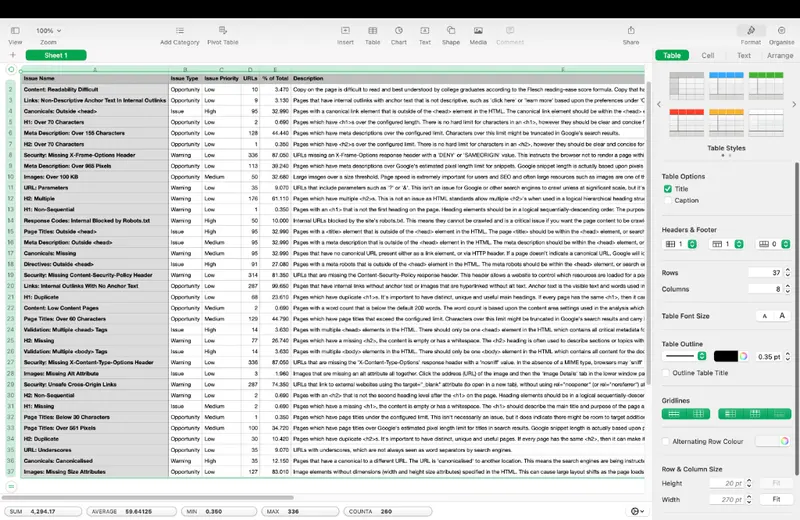
Screaming Frog crawl data showing lingering technical debt and SEO issues
For sites with heavy JavaScript frameworks, crawl traps can silently destroy indexation efficiency. Learn how to eradicate them here: Eradicating JavaScript Crawl Traps in React and Next.js.
Log File Analysis (Advanced but Critical)
- Pull server logs for the past 14 days.
- Analyze Googlebot crawl frequency, status codes returned, and resource allocation.
- Identify if Googlebot is spending crawl budget on low-value parameters, session IDs, or filtered pages.
This step often reveals why new or updated content isn't being indexed promptly. If log analysis is outside your team's bandwidth, our Technical SEO service includes deep-dive log auditing as a standard component.
Hour 12 to 24: Content and Topical Authority Audit
Technical health is the foundation. Now assess whether your content still meets the bar for relevance, depth, and E-E-A-T (Experience, Expertise, Authoritativeness, Trustworthiness), especially critical for YMYL properties.
Step 1: Map Declining Pages to Query Intent
- For each page with significant traffic loss, identify its primary target query.
- Manually search that query in an incognito window. Note what content formats rank now and what new competitors appear.
Step 2: Evaluate Content Depth and Freshness
- Compare your page against the current top 3 results for word count, original data, expert quotes, and freshness.
If your content is thinner, outdated, or lacks demonstrable expertise, it will lose ground during a core update. This is not about keyword density. It is about substantive value.
Step 3: Audit Internal Linking and Topical Clustering
- Use a tool like Ahrefs or Screaming Frog to visualize internal link flow to declining pages.
- Check if key pages are isolated from your main topical clusters.
Weak internal architecture dilutes topical authority. For a systematic approach to building intent-clustered architectures, see: Building Intent-Clustered SEO Architectures.
Core Web Vitals and indexation bloat are the silent killers.
Hour 24 to 48: Synthesis and Strategic Response
You now have three buckets of insight: verified signal, technical health, and content relevance. Time to synthesize and act.
Step 1: Prioritize Fixes Using Impact vs. Effort
Create a simple matrix: High Impact/Low Effort (fix first), High Impact/High Effort (plan for Q1), Low Impact/Low Effort (batch and delegate), Low Impact/High Effort (deprioritize).
Step 2: Build a Recovery Roadmap
Your roadmap should include immediate technical fixes (next 7 days), content refresh priorities (next 30 days), architecture enhancements (next 90 days), and monitoring checkpoints.
Step 3: Prepare for the Next Update
- Set up automated alerts for traffic anomalies.
- Schedule quarterly technical health audits.
- Maintain a content freshness calendar for high-value pages.
The FITPASS Case Study: From 50 Percent Drop to 115 Percent Recovery
This framework is not theoretical. We applied it to FITPASS, a YMYL fitness and wellness platform, after they lost approximately 50 percent of organic traffic during a core update.
Initial reaction: panic. The instinct was to publish more workout guides and nutrition articles to "regain visibility." We paused that impulse. Instead, we executed the 48-hour diagnostic:
- Data Quarantine: Confirmed the drop was algorithmic, not manual.
- Technical Sweep: Discovered poor INP scores on key landing pages due to unoptimized JavaScript.
- Content Audit: Found that top-declining pages lacked expert author bios, cited sources, or original imagery, weakening E-E-A-T signals.
The fix was systematic: Optimized critical rendering paths to improve INP by 68 percent, implemented canonical tags, and added expert contributor bios and medical review badges.
Result: Within four months, organic traffic recovered to 115 percent of pre-drop levels, reaching over 70,000 monthly organic sessions. Read the full breakdown: FITPASS SEO Recovery Case Study.
Your Next Step
Algorithm recovery requires systematic diagnosis, not reactive tactics. If your organic traffic has dropped and you need an embedded strategist to find the root cause, let's talk. Book a free 20-minute strategy call.
For ongoing partnership on technical foundations or content strategy, explore our SEO Consulting or Technical SEO services.
Frequently Asked Questions
How do I know if my traffic drop is from a Google Core Update?
Check the timing of your decline against Google's official update history via the SearchLiaison account on X or the Google Search Status Dashboard. Then verify in Google Search Console that you have no manual actions. If the drop aligns with an update window and no manual penalty exists, it is almost certainly algorithmic.
Should I delete underperforming pages after a core update?
Not immediately. First, diagnose why they underperform. Is it technical, content-related, or architectural? Deletion should be a strategic choice, not a panic reaction.
How long does recovery from a core update take?
There is no fixed timeline. Recovery begins when you fix the root cause. If the issue is technical, improvements can yield gains in 2 to 6 weeks. If the issue is content depth or E-E-A-T, expect 3 to 6 months.
Can I recover without external help?
Yes, if your team has strong technical SEO expertise and bandwidth. However, an external specialist can accelerate diagnosis and avoid costly missteps.
What if my site is YMYL (Your Money or Your Life)?
YMYL sites face higher E-E-A-T thresholds. Prioritize demonstrating expertise, trust, and user experience. Document your content creation and review processes.
Should I wait for the next core update to see if traffic returns?
No. Core updates are not reversible events. Recovery requires active intervention. Use the 48-hour framework to diagnose and act now.